

What Is a DTF Cutter and When Do You Actually Need One?
Quick Answer: If you're cutting fewer than roughly 30–50 designs a day, scissors or a hand-held cutter are still the cheaper option. Once you're regularly gang-sheeting dozens of mixed designs per print run, an automatic DTF cutter usually pays for itself within a few months — not just in labor hours, but in the tighter spacing it lets you use on your gang sheets, which cuts film waste on top of the time saved.
What a DTF Cutter Actually Does
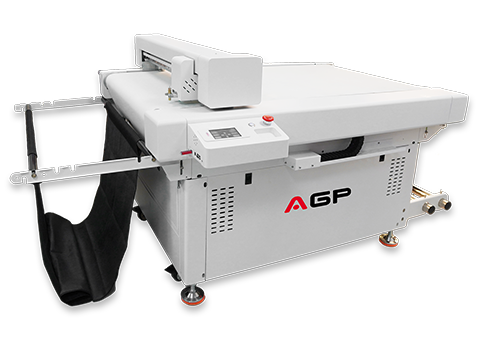
A DTF cutter doesn't print — it takes a printed gang sheet and cuts each design out along its exact outline, called a contour cut, so the transfer is ready to weed and press without manual trimming. Purpose-built DTF cutters use a flatbed with a vacuum bed (not a roll-fed cutter) because DTF film needs a full through-cut — the blade has to cut completely through the film, which requires the material held perfectly flat.
Most automatic DTF cutters use a CCD camera to read registration marks printed alongside each design, letting the cutter locate the exact outline automatically — even if the film shifted slightly during printing — instead of relying on a fixed, pre-programmed path.
The Three Common Ways to Cut DTF Transfers
| Method | How It Works | Best For |
|---|---|---|
| Manual (scissors) | Hand-cut around each printed design | Very low volume, one-off or sample orders |
| Weed border cut | RIP software generates a simple straight-edge cut line around each design's canvas size | Fast turnaround where exact contour precision matters less |
| Automatic contour cut | CCD camera reads registration marks and cuts precisely along the design's actual outline | High-volume, mixed-design gang sheets where precision and speed both matter |
Some cutters also support half-cut (kiss-cut), which scores through the top layer without cutting the backing — useful for specialty film types, but not standard for most apparel DTF transfers.
Manual Cutting vs. Automatic DTF Cutter
| Manual Cutting | Automatic DTF Cutter | |
|---|---|---|
| Speed per sheet | Slow — scales directly with headcount and hours | Fast — one operator can run cutting alongside other tasks |
| Precision | Varies by operator skill; fine detail and small text are hard to cut cleanly | Consistent — CCD tracking holds the same accuracy on every sheet |
| Spacing needed between designs | Wider margins to allow hand-cutting room, increasing film waste | Tighter spacing is workable, improving gang sheet coverage rate |
| Upfront cost | Essentially none | Meaningful equipment investment |
| Best fit | Startups, very low order volume | Growing shops running daily gang sheets and mixed orders |
When a DTF Cutter Actually Pays for Itself
The math isn't just "time saved cutting" — it's time saved plus film saved, since tighter spacing becomes practical once you're not hand-cutting between designs.
- Under ~30–50 designs/day: Manual cutting is usually still the more economical choice — the labor cost stays low enough that automation doesn't pay back quickly.
- 50–150+ designs/day: This is the range where most shops start feeling real pressure — cutting becomes the production bottleneck even when printing keeps up.
- Multiple staff dedicated to trimming: If cutting is consuming a full-time role (or close to it), an automatic cutter typically pays for itself in reclaimed labor within a few months.
If you're already working on getting more designs onto each gang sheet, an automatic cutter is the natural next step after our DTF Gang Sheet Layout Guide — tighter layouts save film, but only if you have a reliable way to cut them apart afterward.
What to Look For When Buying a DTF Cutter
- CCD camera tracking — essential for accurate contour cutting on gang sheets with multiple mixed designs.
- Vacuum bed — holds film flat during the cut; without it, thin or curled film shifts and throws off precision.
- Adjustable cutting force — different film thicknesses and laminated layers need different blade pressure; look for multi-step force control rather than a single fixed setting.
- Working size vs. your printer's film width — match the cutter's bed size to the widest gang sheets you actually print, not just your current average job size.
- RIP/software compatibility — confirm the cutter reads cut paths from your existing RIP software without requiring a separate file conversion step every time.
Frequently Asked Questions
Do I need a DTF cutter to start a DTF printing business?
No — most shops start with manual cutting and add an automatic cutter once cutting time starts slowing down daily production, typically once order volume grows into the dozens of designs per day range.
Can a regular vinyl cutter be used for DTF film?
Not effectively — DTF requires a full through-cut on a flatbed with a vacuum bed to hold the film flat, while most vinyl cutters are roll-fed and designed for a lighter kiss-cut rather than cutting completely through PET film.
How much film can an automatic cutter actually save?
The cutter itself doesn't reduce film use directly — the savings come from being able to space designs more tightly on the gang sheet, since you're no longer leaving wide margins for hand-cutting room. Combined with good layout habits, this can meaningfully improve your overall coverage rate.
What's the difference between a weed border and a contour cut?
A weed border is a simple straight-edge cut around a design's canvas size, generated directly in RIP software with no camera needed. A contour cut follows the design's actual outline using CCD camera tracking, giving a tighter, more precise trim at the cost of slightly more setup.
Ready to automate your finishing step?
See specs and working size on AGP's DTF Cutter C7090, and pair it with tighter layouts using our Gang Sheet Layout Guide.